
Views are a way to look at the information on a page in different formats. For example, Diaries can be viewed as a normal, chronological list, or in a tabular format. When in the tabular view, it is also possible to output into a downloadable PDF document.
To use views, click the Views icon (in the top bar, on the right hand side):

This will drop down (or close) the Views bar. The Views bar is context aware, so it changes depending on the view that is selected. Here's how the views bar looks with the normal view selected in the Diary tab:

When the tabular view is selected, it looks like this:

In the Tabular view, it is possible to have an extra row at the bottom of the table which adds up any additional columns. Those columns are the additional fields added by different Diary Entry Types. For example, if you use the Meeting entry type, then there will be columns for the attendees, or if there was an agenda (etc). Here's an example:
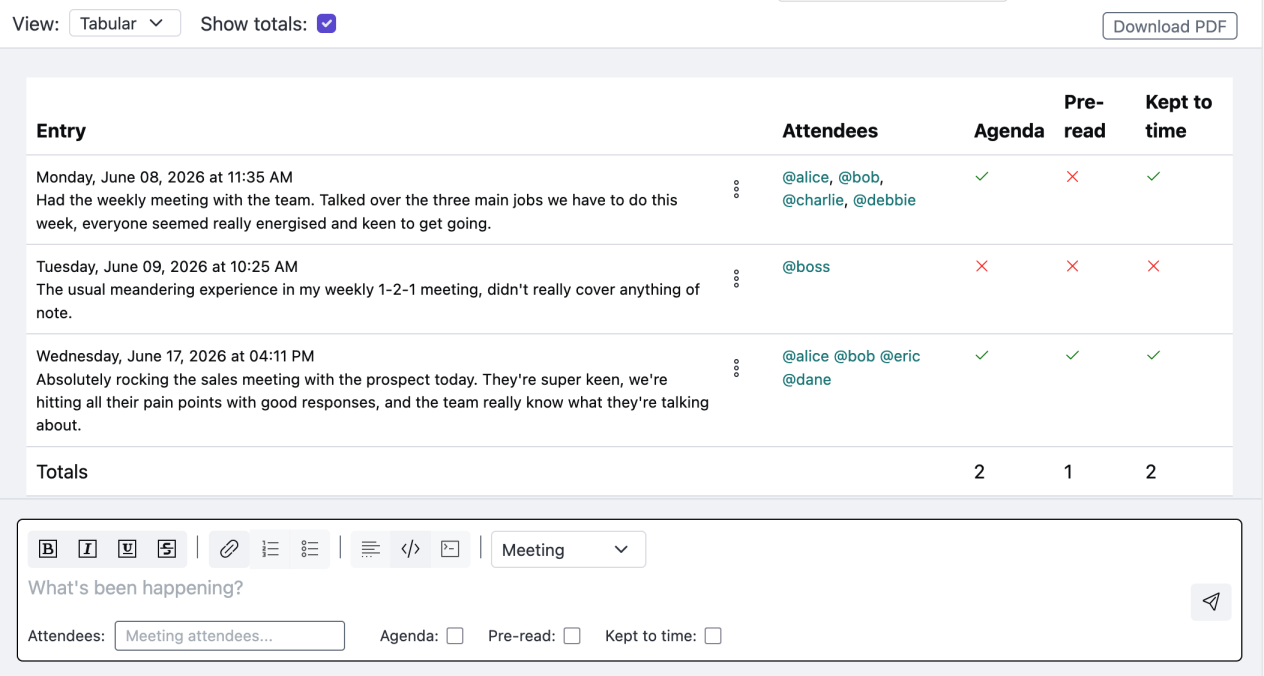
In this view, we have also used a Filter to only show Meeting diary entries. With 'Show Totals' selected, an additional row is shown with the totals for the additional fields in the Meeting entry type. The same is possible for other entry types, such as Hourly or Weekly work types.
The Tabular view also has a PDF document button. Clicking this will download a PDF document representation of the table displayed in the view. This makes it possible to make downloadable or printable copies of summaries of recent events, or to make timesheets etc.